

As I discussed in the post how to register new job card, a nrega job card is issued to a family. And family members are dynamic in nature. That means new members can come to a family and also existing members can leave family too. What will you do in that situation? How to add new member to existing NREGA Job Card ? Here is provision for adding new member to existing nrega job card/family. The following tutorial will teach you how to add new person to existing job card / nrega family in the NREGA portal.
The Add family member option is located as “Add Applicant” option under “2. Registration-Edit/Update” under “D1. Registration & Job Card”. Click that “Add Applicant” link. It will open up a screen as follows :
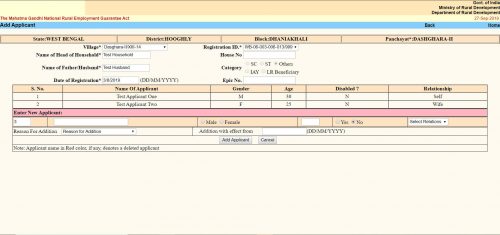
The “Add Applicant” screen looks like the same. Here you get the option to add a single member / applicant at a line. The form is a tabular one. Here you will see all the existing members / applicants already in the family / job card. After them you will get place to enter details of a new member.
- The first text box is the serial number. It cannot be changed.
- Second text box is “Name of the Applicant”. Here you have to put the applicant’s name.
- Next thing is an option button to select gender as “Male” or “Female”.
- Next text box is for the applicant’s age as on the date of addition.
- Next is another option button to select if the applicant is disabled. You have to select “Yes” or “No”.
- Next is a dropdown menu. Here you have to select the relation of the Applicant with the “Head of the Household”. The options will change depending on the gender you selected earlier.
- Next “Reason For addition”. Here you have to choose why do you want to add the applicant to the family. Three options are available.
- “Person attained 18 years of age”
- “Willing to work”
- “Others”
- You can choose any one.
- Next is “Addition with effect from”. Here you should put the current date in DD/MM/YYYY format. In some context if you get the actual addition date you should put that. It can be past date but CANNOT be future date.
- Click the “Add Applicant” button. It will submit the form and the applicant will be added. You will get confirmation message for the same.
- If you want to add another applicant to the same family, you can do the same once again without leaving the page.
https://gruzchikjob.ru/
https://gruzchikikorob.ru/
https://gruzchikibaza.ru/
https://gruzchikietazh.ru/
https://gruzchikistudent.ru/
https://gruzchikivagon.ru/
https://gruzchikibol.ru/
Курсы повышения квалификации для логопедов направлены на профессиональное развитие специалистов в области логопедии, предоставляя им возможность изучать новейшие научные достижения и методики в коррекции нарушений речи. Программы обучения акцентируют внимание на практическом применении современных подходов и технологий в логопедической работе, что способствует повышению эффективности коррекционно-развивающей работы с детьми и взрослыми.
Освойте новые горизонты: повышение квалификации и профессиональная переподготовка педагогов и контролю закупок.
https://gruzchikinesti.ru/
Аттестация медицинских работников на категорию является важным этапом в профессиональной жизни каждого специалиста в сфере здравоохранения. Сайт maps-edu.ru предлагает комплексные программы для медработников, стремящихся повысить свою квалификацию и пройти аттестацию на получение или подтверждение категории. Эти программы разработаны с учетом последних требований и стандартов в медицинском образовании, обеспечивая получение актуальных знаний и навыков. Участие в данных курсах не только повысит ваш профессиональный статус, но и способствует улучшению качества медицинских услуг, что является важным вкладом в здоровье нации. Выбор программы аттестации на сайте maps-edu.ru – это ваш шаг к достижению новых профессиональных высот и уверенности в своих силах как специалиста высокого уровня.
Освойте новые горизонты: повышение категории и контролю закупок.