

As I discussed in the post how to register new job card, a nrega job card is issued to a family. And family members are dynamic in nature. That means new members can come to a family and also existing members can leave family too. What will you do in that situation? How to add new member to existing NREGA Job Card ? Here is provision for adding new member to existing nrega job card/family. The following tutorial will teach you how to add new person to existing job card / nrega family in the NREGA portal.
The Add family member option is located as “Add Applicant” option under “2. Registration-Edit/Update” under “D1. Registration & Job Card”. Click that “Add Applicant” link. It will open up a screen as follows :
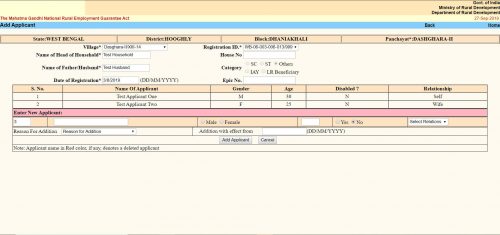
The “Add Applicant” screen looks like the same. Here you get the option to add a single member / applicant at a line. The form is a tabular one. Here you will see all the existing members / applicants already in the family / job card. After them you will get place to enter details of a new member.
- The first text box is the serial number. It cannot be changed.
- Second text box is “Name of the Applicant”. Here you have to put the applicant’s name.
- Next thing is an option button to select gender as “Male” or “Female”.
- Next text box is for the applicant’s age as on the date of addition.
- Next is another option button to select if the applicant is disabled. You have to select “Yes” or “No”.
- Next is a dropdown menu. Here you have to select the relation of the Applicant with the “Head of the Household”. The options will change depending on the gender you selected earlier.
- Next “Reason For addition”. Here you have to choose why do you want to add the applicant to the family. Three options are available.
- “Person attained 18 years of age”
- “Willing to work”
- “Others”
- You can choose any one.
- Next is “Addition with effect from”. Here you should put the current date in DD/MM/YYYY format. In some context if you get the actual addition date you should put that. It can be past date but CANNOT be future date.
- Click the “Add Applicant” button. It will submit the form and the applicant will be added. You will get confirmation message for the same.
- If you want to add another applicant to the same family, you can do the same once again without leaving the page.
Не забудьте воспользоваться промокод акдере ставка для увеличения своих шансов на выигрыш.
Попробуйте скачать akdere взлом, чтобы получить доступ к дополнительным функциям.
I have been examinating out a few of your posts and it’s nice stuff. I will surely bookmark your site.
Hello to every one, the contents present at this web site are really remarkable for people knowledge, well, keep up the good work fellows.
keepnitreal.net/blogs/53813/%D0%A1%D0%B5%D0%BA%D1%80%D0%B5%D1%82-%D1%83%D1%81%D0%BF%D0%B5%D1%85%D0%B0-%D0%9A%D0%B0%D0%BA-%D0%BA%D1%83%D0%BF%D0%B8%D1%82%D1%8C-%D0%B4%D0%B8%D0%BF%D0%BB%D0%BE%D0%BC-%D0%B8-%D0%B8%D0%B7%D0%BC%D0%B5%D0%BD%D0%B8%D1%82%D1%8C-%D1%81%D0%B2%D0%BE%D1%8E-%D0%B6%D0%B8%D0%B7%D0%BD%D1%8CВ
vseogirls.ru/diplomyi-s-unikalnyim-dizaynom-i-oformleniemВ
mazda-demio.ru/forums/index.php?autocom=gallery&req=si&img=4139В
sp12.ru/com/pristroy/open/59В
http://www.kangofitness.ru/index.php?links_exchange=yes&page=70&show_all=yesВ
Если хотите играть с телефона, попробуйте скачать akdere bet на телефон взломанную версию.
Для удобства скачайте приложение скачать акдере и делайте ставки в любое время.
Попробуйте взлом акдере бет, чтобы получить доступ к дополнительным функциям.
Новое akdere bet приложение поможет вам делать ставки в любое время и в любом месте.
Используйте промокод акдере ставка на фрибет 2000 и получите дополнительные средства для ставок.
Попробуйте akdere stavka и слоты, чтобы получить максимум удовольствия от игры.