

As I discussed in the post how to register new job card, a nrega job card is issued to a family. And family members are dynamic in nature. That means new members can come to a family and also existing members can leave family too. What will you do in that situation? How to add new member to existing NREGA Job Card ? Here is provision for adding new member to existing nrega job card/family. The following tutorial will teach you how to add new person to existing job card / nrega family in the NREGA portal.
The Add family member option is located as “Add Applicant” option under “2. Registration-Edit/Update” under “D1. Registration & Job Card”. Click that “Add Applicant” link. It will open up a screen as follows :
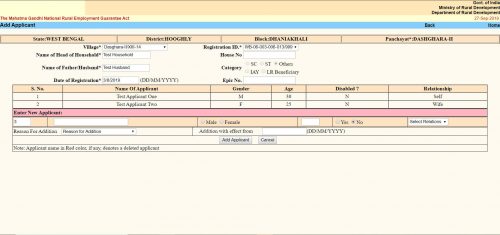
The “Add Applicant” screen looks like the same. Here you get the option to add a single member / applicant at a line. The form is a tabular one. Here you will see all the existing members / applicants already in the family / job card. After them you will get place to enter details of a new member.
- The first text box is the serial number. It cannot be changed.
- Second text box is “Name of the Applicant”. Here you have to put the applicant’s name.
- Next thing is an option button to select gender as “Male” or “Female”.
- Next text box is for the applicant’s age as on the date of addition.
- Next is another option button to select if the applicant is disabled. You have to select “Yes” or “No”.
- Next is a dropdown menu. Here you have to select the relation of the Applicant with the “Head of the Household”. The options will change depending on the gender you selected earlier.
- Next “Reason For addition”. Here you have to choose why do you want to add the applicant to the family. Three options are available.
- “Person attained 18 years of age”
- “Willing to work”
- “Others”
- You can choose any one.
- Next is “Addition with effect from”. Here you should put the current date in DD/MM/YYYY format. In some context if you get the actual addition date you should put that. It can be past date but CANNOT be future date.
- Click the “Add Applicant” button. It will submit the form and the applicant will be added. You will get confirmation message for the same.
- If you want to add another applicant to the same family, you can do the same once again without leaving the page.
matras bestellen http://www.kupit-matras111.ru .
order cialis online The literature reports no consensus on the appropriate management of patients with retroperitoneal fibrosis because no controlled therapeutic trials have been performed
Не хотите переплачивать за бренд? Высокое качество реплик AirPods PRO – это то, что вам нужно! Ознакомьтесь с нашим ассортиментом и выберите вариант, который подойдет именно вам.
Однако мы рекомендуем обратить особое внимание на условия гарантии.
I’m not sure where you’re getting your info, but good topic. I needs to spend some time learning more or understanding more. Thanks for wonderful information I was looking for this information for my mission.
Портал chasnovyn.com.ua – это источник текущих новостей Украины, которые доступны круглосуточно. Статьи снабжены четкими фотографиями. Мы ценим своих читателей и гордимся тем, что можем предложить им самое лучшее. Устраивайтесь поудобнее и читайте важную информацию. chasnovyn.com.ua – https://chasnovyn.com.ua сайт, который действительно заслуживает вашего внимания. Здесь затрагиваются темы политики, экономики и др. Все материалы надежные, не сомневайтесь в их качестве. Посетите наш ресурс и будете в курсе актуальных событий!
Мы предоставляем услуги бухгалтера для успешного ведения бизнеса.
Профессиональная консультация бухгалтера по налогам поможет вам в налоговом планировании.
Мы предоставляем бухгалтерские консультационные услуги для всех видов бизнеса.
Мы предоставляем профессиональные аудиторские консультационные услуги для бизнеса.