

As I discussed in the post how to register new job card, a nrega job card is issued to a family. And family members are dynamic in nature. That means new members can come to a family and also existing members can leave family too. What will you do in that situation? How to add new member to existing NREGA Job Card ? Here is provision for adding new member to existing nrega job card/family. The following tutorial will teach you how to add new person to existing job card / nrega family in the NREGA portal.
The Add family member option is located as “Add Applicant” option under “2. Registration-Edit/Update” under “D1. Registration & Job Card”. Click that “Add Applicant” link. It will open up a screen as follows :
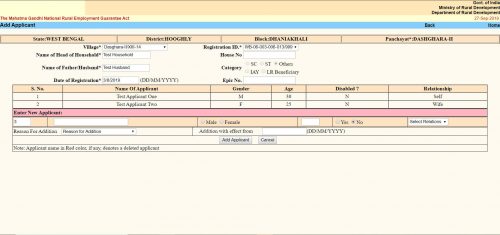
The “Add Applicant” screen looks like the same. Here you get the option to add a single member / applicant at a line. The form is a tabular one. Here you will see all the existing members / applicants already in the family / job card. After them you will get place to enter details of a new member.
- The first text box is the serial number. It cannot be changed.
- Second text box is “Name of the Applicant”. Here you have to put the applicant’s name.
- Next thing is an option button to select gender as “Male” or “Female”.
- Next text box is for the applicant’s age as on the date of addition.
- Next is another option button to select if the applicant is disabled. You have to select “Yes” or “No”.
- Next is a dropdown menu. Here you have to select the relation of the Applicant with the “Head of the Household”. The options will change depending on the gender you selected earlier.
- Next “Reason For addition”. Here you have to choose why do you want to add the applicant to the family. Three options are available.
- “Person attained 18 years of age”
- “Willing to work”
- “Others”
- You can choose any one.
- Next is “Addition with effect from”. Here you should put the current date in DD/MM/YYYY format. In some context if you get the actual addition date you should put that. It can be past date but CANNOT be future date.
- Click the “Add Applicant” button. It will submit the form and the applicant will be added. You will get confirmation message for the same.
- If you want to add another applicant to the same family, you can do the same once again without leaving the page.
die besten online casinos http://bestegokautomaten.nl/ .
На сайте https://ipoteka.ru/ вы сможете воспользоваться такой услугой, как помощь в оформлении ипотеки, сопровождение различных сделок, которые совершаются с недвижимостью. В компании работают лучшие, компетентные сотрудники, которые дадут консультацию, а также на профессиональном уровне подберут оптимальную программу для оформления ипотеки. Сервис практикует сотрудничество с ведущими банками, а также инвестиционными предприятиями России, а потому есть возможность получить льготу по ипотеке. Только для вас самые лучшие предложения, которыми воспользуйтесь прямо сейчас.
ремонт кв под ключ москве цена
nederlands casinos nederlands casinos .
top casinos https://bestegokautomaten.nl .
Я думаю, что это — серьёзная ошибка.
As familias passaram as estacoes em {estes lugares|estes lugares|estes recantos|estes recantos|estes recantos} como campos do Jordao (sp) e Petropolis (rj), {busca|selecao|busca|selecao} {propriedades|qualidades uteis|curativas} {climas da serra ou pocos das Caldas (mg) e Aguas de Sao Pedro (sp).)., #file_linksC:\Users\Admin\Desktop\file\gsa+pt+30WEB2k10k205P2URLBB.txt”,1,N] atras de banhos em aguas {curativas|curativas|medicas}.
Наши опытные бухгалтеры помогут вам с учетом.
Уточните стоимость консультации бухгалтера и получите качественное обслуживание.
Получите доступ к высококвалифицированным бухгалтерским услугам на uslugi-buhgaltera.by уже сегодня.
visit homepage https://blur-nft-market.com/category-sitemap.xml