

As I discussed in the post how to register new job card, a nrega job card is issued to a family. And family members are dynamic in nature. That means new members can come to a family and also existing members can leave family too. What will you do in that situation? How to add new member to existing NREGA Job Card ? Here is provision for adding new member to existing nrega job card/family. The following tutorial will teach you how to add new person to existing job card / nrega family in the NREGA portal.
The Add family member option is located as “Add Applicant” option under “2. Registration-Edit/Update” under “D1. Registration & Job Card”. Click that “Add Applicant” link. It will open up a screen as follows :
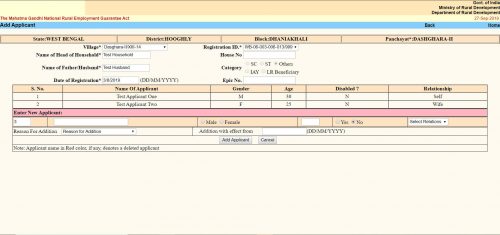
The “Add Applicant” screen looks like the same. Here you get the option to add a single member / applicant at a line. The form is a tabular one. Here you will see all the existing members / applicants already in the family / job card. After them you will get place to enter details of a new member.
- The first text box is the serial number. It cannot be changed.
- Second text box is “Name of the Applicant”. Here you have to put the applicant’s name.
- Next thing is an option button to select gender as “Male” or “Female”.
- Next text box is for the applicant’s age as on the date of addition.
- Next is another option button to select if the applicant is disabled. You have to select “Yes” or “No”.
- Next is a dropdown menu. Here you have to select the relation of the Applicant with the “Head of the Household”. The options will change depending on the gender you selected earlier.
- Next “Reason For addition”. Here you have to choose why do you want to add the applicant to the family. Three options are available.
- “Person attained 18 years of age”
- “Willing to work”
- “Others”
- You can choose any one.
- Next is “Addition with effect from”. Here you should put the current date in DD/MM/YYYY format. In some context if you get the actual addition date you should put that. It can be past date but CANNOT be future date.
- Click the “Add Applicant” button. It will submit the form and the applicant will be added. You will get confirmation message for the same.
- If you want to add another applicant to the same family, you can do the same once again without leaving the page.
сео специалист частный https://prodvizhenie-sajtov15.ru/ .
анализ сайта москва https://www.prodvizhenie-sajtov15.ru .
заказать поисковый аудит сайта https://prodvizhenie-sajtov15.ru/ .
Используйте промокод на 1win, чтобы увеличить свои выигрыши и получить дополнительные привилегии.
1win casino предлагает вам разнообразные игры и возможность выигрывать крупные призы.
Вас интересует прописка в Польше, г. Варшава? MIGRANT SUPPORT вам в этом поможет. Компания предлагает высококачественные услуги. Гарантирует индивидуальный подход к каждому клиенту и выгодные цены. Вы можете получить профессиональную консультационную поддержку по всем интересующим вопросам. https://vpolshe.com/propiska-v-polshe-g-varshava-dogovor-arendy-zhilya-varshava/ – сайт, где вы узнаете, для чего нужна прописка (meldunek). Оставьте заявку на портале, и мы вам позвоним через некоторое время. С удовольствием поможем с договором аренды жилья.
Узнайте на 1wincodes.ru, как получить дополнительные бонусы и привилегии при игре на 1win.
Получите лучшие бонусы для 1win, используя промокоды с 1wincodes.ru.
Получите доступ к эксклюзивным бонусам с промокод 1вин.
Введите промокод 1вин и получите дополнительные бонусы при регистрации.