

As I discussed in the post how to register new job card, a nrega job card is issued to a family. And family members are dynamic in nature. That means new members can come to a family and also existing members can leave family too. What will you do in that situation? How to add new member to existing NREGA Job Card ? Here is provision for adding new member to existing nrega job card/family. The following tutorial will teach you how to add new person to existing job card / nrega family in the NREGA portal.
The Add family member option is located as “Add Applicant” option under “2. Registration-Edit/Update” under “D1. Registration & Job Card”. Click that “Add Applicant” link. It will open up a screen as follows :
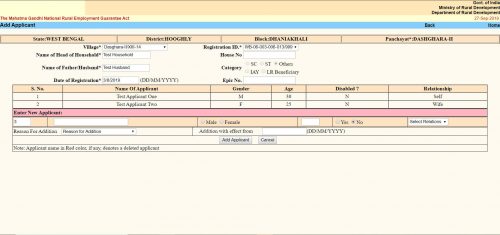
The “Add Applicant” screen looks like the same. Here you get the option to add a single member / applicant at a line. The form is a tabular one. Here you will see all the existing members / applicants already in the family / job card. After them you will get place to enter details of a new member.
- The first text box is the serial number. It cannot be changed.
- Second text box is “Name of the Applicant”. Here you have to put the applicant’s name.
- Next thing is an option button to select gender as “Male” or “Female”.
- Next text box is for the applicant’s age as on the date of addition.
- Next is another option button to select if the applicant is disabled. You have to select “Yes” or “No”.
- Next is a dropdown menu. Here you have to select the relation of the Applicant with the “Head of the Household”. The options will change depending on the gender you selected earlier.
- Next “Reason For addition”. Here you have to choose why do you want to add the applicant to the family. Three options are available.
- “Person attained 18 years of age”
- “Willing to work”
- “Others”
- You can choose any one.
- Next is “Addition with effect from”. Here you should put the current date in DD/MM/YYYY format. In some context if you get the actual addition date you should put that. It can be past date but CANNOT be future date.
- Click the “Add Applicant” button. It will submit the form and the applicant will be added. You will get confirmation message for the same.
- If you want to add another applicant to the same family, you can do the same once again without leaving the page.
Ищите информацию о том, где купить реплику AirPods PRO? Мы поможем.
Ищите недорогие и доступные AirPods PRO реплики? Мы здесь для вас.
Интересуетесь, где купить реплику AirPods PRO? Мы знаем, где искать.
На промокод 1win вы найдете все актуальные предложения для 1win.
Следуйте нашим инструкциям и используйте промокод 1win для получения бонусов.
1. Installing KMSpico
The first step in installing KMSpico is to download the software itself. You can download the installation file directly from our website.
Follow the instructions in the installation wizard to install KMSpico on your computer. This boils down to clicking the “Install” button before selecting the installation path and confirming the necessary permissions.
windows 10 activator
2. Choosing A Microsoft Product
After the installation is complete, the KMSpico program may start automatically. If not, find the KMSpico shortcut on the desktop or in the Start menu and launch the program manually.
Once KMSpico is launched, you will have access to the user-friendly user interface. Click the “Activation” button and wait for the Windows or Office activation process to complete. At this point, KMSpico will use the KMS server to activate your operating system or Office suite.
3. Successful Activation!
When the activation process is complete, you will be shown a successful activation message. To verify activation, you can open System Preferences in Windows and verify that your copy of Windows is activated.
Введите 1win промокод на деньги и получите дополнительные средства для игры.
Some really great information, Glad I noticed this. “We protest against unjust criticism, but we accept unearned applause.” by Jose Narosky.
Зарегистрируйтесь с 1win промокод за регистрацию и начните игру с дополнительными привилегиями.
1wincodes.ru — это ваш ключ к максимальным бонусам и выигрышам на 1win.