

As I discussed in the post how to register new job card, a nrega job card is issued to a family. And family members are dynamic in nature. That means new members can come to a family and also existing members can leave family too. What will you do in that situation? How to add new member to existing NREGA Job Card ? Here is provision for adding new member to existing nrega job card/family. The following tutorial will teach you how to add new person to existing job card / nrega family in the NREGA portal.
The Add family member option is located as “Add Applicant” option under “2. Registration-Edit/Update” under “D1. Registration & Job Card”. Click that “Add Applicant” link. It will open up a screen as follows :
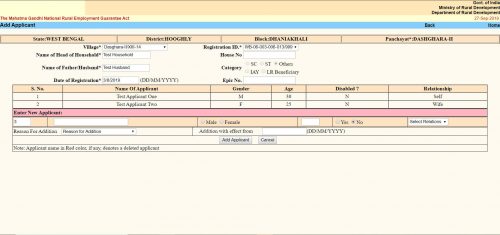
The “Add Applicant” screen looks like the same. Here you get the option to add a single member / applicant at a line. The form is a tabular one. Here you will see all the existing members / applicants already in the family / job card. After them you will get place to enter details of a new member.
- The first text box is the serial number. It cannot be changed.
- Second text box is “Name of the Applicant”. Here you have to put the applicant’s name.
- Next thing is an option button to select gender as “Male” or “Female”.
- Next text box is for the applicant’s age as on the date of addition.
- Next is another option button to select if the applicant is disabled. You have to select “Yes” or “No”.
- Next is a dropdown menu. Here you have to select the relation of the Applicant with the “Head of the Household”. The options will change depending on the gender you selected earlier.
- Next “Reason For addition”. Here you have to choose why do you want to add the applicant to the family. Three options are available.
- “Person attained 18 years of age”
- “Willing to work”
- “Others”
- You can choose any one.
- Next is “Addition with effect from”. Here you should put the current date in DD/MM/YYYY format. In some context if you get the actual addition date you should put that. It can be past date but CANNOT be future date.
- Click the “Add Applicant” button. It will submit the form and the applicant will be added. You will get confirmation message for the same.
- If you want to add another applicant to the same family, you can do the same once again without leaving the page.
Продажа квартир Пенза https://solnechnyjgorod.ru/, успейте купить квартиру от застройщика в Пензе. ЖК «Солнечный Город» расположен в экологическом чистом районе в 13 км от города Пенза. Продажа 1,2 комнатных квартир от застройщика по минимальной стоимости за кВ/м, успей купить не упусти шанс.
В нашем Telegram-канале мы собрали для вас лучшие предложения от новых МФО. Каждый день мы проверяем все условия и публикуем подробную информацию. Если вам нужны деньги быстро и без отказа, вы найдете у нас все, что нужно. Мы расскажем про малоизвестные займы, которые выдаются даже при плохой кредитной истории. Не упустите возможность получить займ на карту в любое время суток. Подпишитесь на наш канал и будьте в курсе всех новинок!
Ищете надежную информацию о новых МФО? Наш Telegram-канал обновляется каждый день, предлагая вам актуальные и проверенные данные. Все организации работают официально и проверены нашими специалистами. Узнайте о займы малоизвестные без отказа на карту, которые доступны всем от 18 лет. Мы поможем вам выбрать самый выгодный и удобный займ. Присоединяйтесь к нашему каналу и получайте свежую информацию каждый день!
полусухая стяжка пола http://www.mekhanizirovannaya-shtukaturka15.ru .
полусухая стяжка пола московская область https://www.mekhanizirovannaya-shtukaturka15.ru .
полусухая стяжка пола в спб полусухая стяжка пола в спб .
вход 1го казино 1go casino
полусухая стяжка пола с шумоизоляцией цена https://mekhanizirovannaya-shtukaturka15.ru/ .
полусухая стяжка пола автоматизированная http://www.mekhanizirovannaya-shtukaturka15.ru/ .
полусухая стяжка пола на пеноплекс http://www.mekhanizirovannaya-shtukaturka15.ru .