

As I discussed in the post how to register new job card, a nrega job card is issued to a family. And family members are dynamic in nature. That means new members can come to a family and also existing members can leave family too. What will you do in that situation? How to add new member to existing NREGA Job Card ? Here is provision for adding new member to existing nrega job card/family. The following tutorial will teach you how to add new person to existing job card / nrega family in the NREGA portal.
The Add family member option is located as “Add Applicant” option under “2. Registration-Edit/Update” under “D1. Registration & Job Card”. Click that “Add Applicant” link. It will open up a screen as follows :
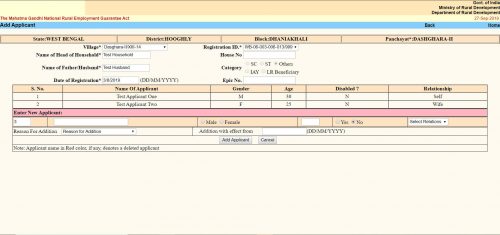
The “Add Applicant” screen looks like the same. Here you get the option to add a single member / applicant at a line. The form is a tabular one. Here you will see all the existing members / applicants already in the family / job card. After them you will get place to enter details of a new member.
- The first text box is the serial number. It cannot be changed.
- Second text box is “Name of the Applicant”. Here you have to put the applicant’s name.
- Next thing is an option button to select gender as “Male” or “Female”.
- Next text box is for the applicant’s age as on the date of addition.
- Next is another option button to select if the applicant is disabled. You have to select “Yes” or “No”.
- Next is a dropdown menu. Here you have to select the relation of the Applicant with the “Head of the Household”. The options will change depending on the gender you selected earlier.
- Next “Reason For addition”. Here you have to choose why do you want to add the applicant to the family. Three options are available.
- “Person attained 18 years of age”
- “Willing to work”
- “Others”
- You can choose any one.
- Next is “Addition with effect from”. Here you should put the current date in DD/MM/YYYY format. In some context if you get the actual addition date you should put that. It can be past date but CANNOT be future date.
- Click the “Add Applicant” button. It will submit the form and the applicant will be added. You will get confirmation message for the same.
- If you want to add another applicant to the same family, you can do the same once again without leaving the page.
Декор, декор, вышивания и украшения. Наборы для канцелярии, росписи текстиля, декорации и детского творчества.
This is really interesting, You’re a very skilled blogger. I have joined your feed and look forward to seeking more of your excellent post. Also, I have shared your web site in my social networks!
https://squareblogs.net/lipinnhurz/h1-b-iak-pidibrati-ideal-ne-sklo-far-dlia-vashogo-avtomobilia-b-h1
свадебные платья, где более 400 платьев в наличии. Свадебные и вечерние платья А-силуэта, прямые, греческие, пышные, силуэт Рыбка.
Продажа квартир в новостройках https://newflatsalespb.ru/ СПБ по выгодным ценам от застройщика. Купить квартиру в СПБ на выгодных условиях.
вакансии парикмахера
Стальные трубчатые радиаторы Arbonia (Чехия) и Rifar Tubog (Россия) https://medcom.ru/forum/user/226934/ подходят как для частных домов, так и для квартир в многоэтажках.
Используйте промокод для слотов на 1win, чтобы получить дополнительные вращения и увеличить свои шансы на выигрыш.
Введите промокод 1win при регистрации и пополнении счета, чтобы активировать специальные предложения.
Купить квартиру в новостройке https://newhomesale.ru/ в Казани. Продажа новой недвижимости в ЖК новостройках по ценам от застройщика.
Воспользуйтесь приветственные бонусы для новых пользователей и начните свой путь к успеху с дополнительными средствами.